Thursday, May 31, 2012

Wubi usage/opinion survey

Things have been a little quiet on the Wubi support front, since the 12.04 release (which resolved a lot of the usability bugs in Wubi.) So while twiddling my thumbs, I decided to find out how Wubi is perceived in the community.

Clearly there are many vocal 'anti-Wubi' voices, but how - I wondered - does the general community receive this product? I created a survey via surveymonkey.com and advertised it in The Community Cafe section on ubuntuforums.org. The idea was to target more seasoned Ubuntu community members.

Q. What sorts of users responded to the survey
77% of the respondents stated that they used Ubuntu more than Windows.
65% had experience with Wubi, either running it currently (9%) or having run it in the past (56%) 


Q. How many users responded
43 users completed the survey


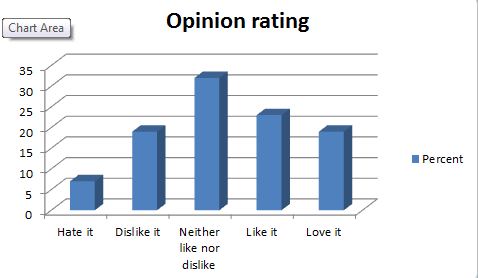
Q. What was the opinion of Wubi
The following chart shows the opinion the respondents had of Wubi. e.g. 30% neither liked nor disliked Wubi.
The following chart shows the average opinion rating, broken down by category of user (on the chart a value of 1 = "Hate it", 2 = "Dislike it", 3 = "Neither Like nor Dislike it", 4 = "Like it"  and 5 = "Love it".)
The first column is the average for all respondents (3.28), and the rest are broken down by whether the respondent has ever used Wubi (or is currently using it). It shows that the opinion of Wubi is higher amongst those who have used Wubi (perhaps not surprisingly).


Q. Who would recommend Wubi
The following graph shows who would recommend Wubi to others to try out Ubuntu. The graph is broken down by category of user (first column is all respondents.) Again, not surprisingly, those who had used Wubi were more likely to recommend it.  Users who had no experience with Wubi were extremely reluctant to recommend it.


Conclusion
I was a little surprised to see the results. I expected to see more negativity to Wubi amongst non-Wubi users. But it should be noted that even though the average opinion rating wasn't bad in this category (2.47) only 7% would recommend Wubi to a new user to 'Try out Ubuntu'.

Contrast that with the average opinion rating of those that have used Wubi (3.54) or those that currently use Wubi (4.75) and you see a recommendation of 67% and 100% respectively. So these users clearly feel there is some value for introducing Ubuntu to newcomers.

Appendix
Here is a list of the questions on the survey. Questions with an asterix were mandatory.

  1. *Do you run Ubuntu installed with Wubi? (Yes/No)
  2.  If you answer No to Q1, have you ever installed Ubuntu using Wubi (Yes/No)
  3.  If you used or are using Wubi, how long have you used it? (<1 day /<1week /<1month /<3months /<1year />1year)
  4. Have you upgraded releases using Wubi? (Yes/Yes but it failed/No)
  5. *Do you use Ubuntu more or less than Windows? (Less/Same/More)
  6. *Do you ever force shutdown (power off) your computer if it hangs? (Never/ Sometimes/Frequently)
  7.  If you are currently using Wubi, are you planning to move to a normal dual boot in the future, or stay with Wubi? (Reinstall/Migrate/Stay with Wubi/Not sure)
  8. *Would you recommend Wubi to others to try out Ubuntu? (Yes/No)
  9. *What's your overall opinion of Wubi (1-Hate it/2-Dislike it/3-Neither like nor dislike it/4-Like it/5-Love it)

Tuesday, May 29, 2012

Wubi Kubuntu not working in 12.04

You cannot install 12.04 Kubuntu when running wubi.exe standalone at this time. The addresses of the ISOs are incorrect so it will fail.

Cause
I'm not entirely sure but perhaps this has something to do with Canonical no longer supporting Kubuntu. Whatever the reason, the ISOs are now hosted on http://cdimages.ubuntu.com/kubuntu/releases/12.04/release/ instead of http://releases.ubuntu.com/releases/kubuntu/ (as it was in prior releases). Unfortunately this wasn't picked up in testing as Wubi uses a different download site while in development. It's only after release that this switches over.

Fix?
I've submitted a bug patch that may or may not be accepted as an SRU (stable release update) - if you read a previous post you'll know that these are now possible for wubi.exe whereas they weren't previously. But in the meantime you'll have to use a workaround to try Kubuntu

Workaround
Download the Kubuntu Desktop CD ISO manually from here and save it in the same folder as wubi.exe before running.

Friday, May 11, 2012

How to run the development release with Wubi

Prepare for breakage
This goes without saying, but I like to say it anyway. If you choose to follow these instructions, and you lose your installation/data or worse - you're on your own. That said, I've been running the development release on Wubi since 11.10 and with a few precautions you should be okay. 
Note: Since the 32-bit non-pae kernel will not be supported in 12.10, I advise not following these instructions if you are using the 32-bit non-pae kernel.

Backup and restore
Even though I am aware that things could go awry, it's still irritating to lose the install. So I keep a fully synched backup of the root.disk. After running updates (which you'll probably get used to doing every time you boot), once you've rebooted and confirmed things are stable, you can resynch your backup. 

Here's how to do it:
  1. Make a copy of your root.disk using the Wubi resize script 
  2. Keep it synchronized by rerunning the script, but supplying the --resume option (which will copy only files that have been modified/added and delete ones that have been removed).
  3. Make the new.disk bootable (so you can confirm it works without booting to Windows to rename the disks). You do this by adding the following lines to /etc/grub.d/40_custom (changing the bits in red to match your own settings):
menuentry 'Ubuntu - backup new.disk' --class ubuntu --class gnu-linux --class gnu --class os {
        set gfxpayload=$linux_gfx_mode
        insmod part_msdos
        insmod ntfs
        set root='(hd0,msdos3)'
        search --no-floppy --fs-uuid --set=root 18B4B7BBB4B799A8
        loopback loop1 /ubuntu/disks/new.disk
        set root=(loop1)
        linux   /vmlinuz root=UUID=18B4B7BBB4B799A8 loop=/ubuntu/disks/new.disk ro   quiet splash vt.handoff=7
        initrd  /initrd.img
}

Then you'll see "Ubuntu - backup new.disk" at the bottom of the grub menu when you boot. If you don't see the grub menu, hold down the Shift key after selecting Ubuntu.

Upgrading to Quantal
Since there is no Wubi.exe version for Quantal available at this early stage of development, the only way to get it is to install 12.04 Precise Pangolin, and then modify your sources.list. (Note, once the Alpha1 is released you may be able to install normally and in this case you should not use this method).
sudo sed -i 's/precise/quantal/g' /etc/apt/sources.list
sudo apt-get update && sudo apt-get dist-upgrade 

Partial upgrades
Always review the results before running dist-upgrades. In particular, look at what is being removed. It's fairly common for the packages to be out of synch at times during the development release, and if you're not careful you might uninstall critical bits. My rule of thumb is, if anything is being deleted look for a newer version of it being installed. If there is no corresponding entry, then wait a few days. Sometimes you'll find the packages are no longer listed as being removed. In other cases, they're still there and it's probably safe to proceed. If you notice a lot of packages being deleted, run away.

Where to go for help
Please review the Sticky threads in the Ubuntu+1 forum on ubuntuforums.org. If you have any questions or problems, look there to see if someone else has a solution or post your own questions. 

Tuesday, April 17, 2012

How to upgrade a Wubi install

Yes it's that time again. A new Ubuntu release is around the corner, and that means that many people will be upgrading. If you have a Wubi install and look for advice, you'll probably be sternly warned that "Wubi wasn't intended for long term use... blah blah yawn". That's all great, but you're using Wubi and want to upgrade, and the reality is many people will do it anyway.

Upgrades fail

Shocking, but true. Ubuntu upgrades do fail. Frequently. Many people swear by fresh installs. Personally, I've upgraded to every release since 9.10 and with Wubi testing since 8.04. And 9 times out of 10 they worked okay (for me). The upgrade to 10.04 was probably the worst as you had to Ctrl-C at some point during a loop etc.

But nonetheless, every install is different and many fail (Wubi and normal both). So what to do?

Backup

This is a no-brainer. It's so easy to write it and read it and agree with it. But the way that the Update Manager suddenly jumps up "A new release is available. Do you want to upgrade?" - it seems so easy to just click that button. Even without reading the release notes (which may help you but not in all cases).
So... DON'T DO IT. Not until you've got a disaster recovery plan in place (the work-speak way of saying you have a backup and know how to restore it).

You should probably already have all your important data backed up, stored on the /host or other normal partition (or synched to Ubuntu One). Because data on the virtual disk is at a higher risk of being lost.

Full Wubi backups

On Wubi, it's really simple to do make a fully bootable backup. If you installed on your C: 'drive', then boot Windows, and copy the entire C:\ubuntu\disks folder. It's going to be big, so make sure you have enough free space, or copy it to an external drive if you need to. If things go wrong during the upgrade, you just have to copy it back and you have a full Ubuntu restore.

Preparation for upgrade

Make sure you have enough free space on the root.disk. Many people underestimate how much space is needed (and apparently the Ubuntu upgrade process also underestimates it, or has in the past). Personally I would make sure there's 5GB free, maybe 3GB minimum (that's sucking it out of my thumb, but the message is don't try it with the bare minimum).  Note, you can also resize the root.disk if you need to. At the same time, process all updates to the current release before hand.
To check free space, run df -h from the terminal (Ctrl+Alt+T). You're looking for the amount of free space on /dev/loop0 (that's the 'loop-mounted' root.disk)

Browse the forums

Take the time to see how bad the upgrade is. Other people will be doing it and posting the results (if they are bad). Get a feel for what the problems are.

Alternate CD upgrade

I strongly recommend using the Alternate CD to upgrade. Why? Because when the new release comes, every man and his dog starts to upgrade, and the servers struggle. So a 1 hour download suddenly becomes 3 hours or longer. Or times out. And you're up at 2am watching it (because at some point you're going to have to click that darn "OK" button for some meaningless prompt, or else you'll have to do it when you wake up).

Whereas, if you download the Alternate CD ISO, using a bittorrent client, it will likely take 30 minutes. Then you upgrade offline (maybe not recommended by Canonical, because this stops you downloading the latest packages) and you've just saved yourself a couple of hours. 

There's no rush

It's not going to hurt you to wait a month to upgrade. At that point, it should be very clear what problems there are if any, and there may even be fixes. Also the servers will be quieter, so doing an online upgrade gets you the latest packages. You can still run the Alternate upgrade, but let it download the latest packages online (still quicker than downloading all the new packages).

Caveats

Normally by this time in the development cycle, I've run a few Wubi upgrades. So I'm usually speaking from a position of knowledge that the upgrade can work. This time, I've been unable to test due to one of my computers dying, and a bunch of other time consuming things. Maybe I'll get the time to do this still (9 days to go as at the time of writing, in which case I'll add a comment to indicate that).


Update: I ran two upgrades, 10.04 to 12.04 and 11.10 to 12.04. I ran both online (not with the alternate CD - it helps having a 50Mbps connection and minimal server traffic). I confirmed that 2 GB is too little space - it downloads about 1800 packages and 'unpacks' them - and this uses a lot of space (that is mostly freed up at the end). So be warned - the upgrade tool does not stop you running out of space.
The 11.10 upgrade was on a real, in use installation, and worked flawlessly. The 10.04 was on a brand new, bare-bones 10.04.4 install with updates applied, and gave a number of errors and some weirdness (empty message box with 2 unknown buttons) - but succeeded as well.

Summary
1. Backup (always prepare for the worst)
2. Minimum 3 GB free space (preferably more)
3. 1800 packages to download so consider using the Alternate CD to speed things up

Another update: if you have a custom graphics driver, or use ppas, then it seems to be recommended to remove these before upgrading, and then reinstall following the upgrade.

Wednesday, April 4, 2012

How to migrate - updated for release 12.04 Precise Pangolin

A new version of the Wubi migration script will be released for Ubuntu 12.04 Precise Pangolin. There have been some minor changes that are required for release 12.04, and a few features added.

The simple migration hasn't changed

It's still straightforward to do a migration, for example if the target partition is /dev/sda5 and the swap partition is /dev/sda6, you can migrate as follows:
sudo bash wubi-move-2.2.sh /dev/sda5 /dev/sda6

New features

These are some of the changes with version 2.2 of the script:
  • Simplified interaction
  • Improved validation and diagnostics
  • Migrate to separate target partitions e.g. for / (root), /boot, /usr, and /home
  • Run migration validation pre-check without making any changes
  • Resume a migration that failed due to e.g. a corrupt file, without having to recopy everything
  • Synchronize a migrated install (e.g. to keep a fully bootable backup)

More information

For full instructions run:
bash wubi-move-2.2.sh --help

How to download

As usual, you can download the script from the HOWTO: migrate wubi install to partition thread on ubuntuforums.org. Select the file wubi-move-2.2.tar.gz, download, then right-click, and Expand. This will create a new directory with 3 scripts: wubi-move-2.2.sh, check-source.sh and check-targets.sh.

How to migrate in pictures


How to migrate from a root.disk

In the following example, the partition containing the root.disk is labeled 'wubi install' so the mountpoint is: /media/wubi install (including the space). This needs to be 'escaped' with '\' when specifying the location as shown in the screenshots below. Note also that this example uses a swap partition that is already used by another install (so option --shared-swap is specified to prevent running mkswap):


How to migrate to separate partitions

In the following example, there is a separate partition for /boot and /home in addition to the standard target (/) and swap partition. In addition, this example uses the  --shared-swap and --no-bootloader option:


Some notes on --resume and --synch

The new options --resume and --synch are designed to save time, either when the migration terminates due to rsync copy errors, or a refreshed migration is desired. Normally the script will only proceed on an empty partition (to prevent loss of data), so these options are the only way to bypass this - and they make use of rsync's sychronization ability to only copy files that are missing/changed.

Since this does introduce a little risk, these options rely on a control file created the first time the migration is started. This ensures that the target partitions are the same as on the prior run. In other words, resubmit the migration command in the exact same way, but append --resume on the end.

The idea behind the --synch option is to keep a bootable backup e.g. on an external drive. This can be quickly syncronized prior to performing major updates (like an release upgrade). 
Warning - synchronization will remove anything added to the migrated install that's not on the source install (in other words, don't use this option if you are actively using the migrated install).
This option is probably more useful for non-Wubi installs, so use it after you've migrated from Wubi (the script works on normal installs too).

Friday, March 23, 2012

Wubi disabled on live CD?

I wasn't going to blog about this... but since it made OMG! Ubuntu as a sensational article, I'd be remiss not to mention it.

Yes, it was floated on the ubuntu-devel mailing list to disable the ability to install using Wubi on the Ubuntu desktop CD. This didn't receive much discussion and so it's unclear what decision was made (if any), but I guess we'll find out soon enough with just a handful of weeks to go before 12.04 Precise Pangolin is released.

Background
Wubi.exe is released as part of the desktop CD ISO. This is fixed at release. So whenever you download the ISO you are getting the exact same one that others got on the release date... e.g. 11.04 - it's been out for a year, lots of updates, but the ISO is the same. Once you install Ubuntu 11.04, you'll be downloading 300+MB of patches. But since Wubi.exe is on the ISO it's also fixed for the duration of each cycle.

Why is this a problem? Wubi.exe typically gets limited testing during the development cycle. It doesn't get much development either - as the basic function doesn't usually change that much (11.10 was an exception to this). Most of this development tends to be after everything else is frozen, so the testing that was done early in development isn't always relevant. I could come up with other reasons, but you get the point. You're saddled with whatever bugs there are (some pretty irritating ones) - and even though many people download wubi.exe standalone, it's still fixed in stone.

Conclusion
So, in theory this is a great idea. We wouldn't have to live with irritating bugs, and instead of all the volunteers who support Wubi on Ubuntuforums.org having to repeat the same response 500 times, they could spend less effort making sure that the bugs are reported clearly so that a speedy fix can result.

However
It's still kind've nice to hand over a CD to someone and let them try out Ubuntu using Wubi, without having to download anything. I don't know how often this happens, but I guess there will be some who miss it. The question is, do you have to completely disable the CD install method to allow a stable release update to the standalone wubi.exe? Why not support both options?

Thursday, March 8, 2012

Wubi call for testing

We're about 7 weeks away from the next LTS release, 12.04 Precise Pangolin, and this is a critical phase to get all the Wubi bugs ironed out. The reason is simple: after the release Wubi.exe is not modified so we'll have to live with any bugs for at least 6 months.

Wubi development testing is typically under-represented by the Ubuntu community because it's mostly used by newcomers to Ubuntu (and many hardcore users don't have Windows). Wubi is the first impression of Ubuntu for many, and so it's important that this is a good experience. Since 11.04 was released, Wubi has been very stable, but there's always room for improvement and to get rid of any irritating bugs.

With that in mind there has been a call to testing on ubuntuforums.org. If you have the ability then please help out, and provide feedback in that thread and/or file bugs on https://bugs.launchpad.net/wubi/+filebug.

There are a number of ways to run Wubi tests:
1. Download wubi.exe and run it standalone (during dev you can get it from here)
2. Download the Desktop CD ISO, burn it to CD if it fits (or DVD), and run it from there.

Note: each time you install Wubi it uninstalls any existing Wubi install (so if you use Wubi normally you can't easily test it unless you are comfortable backing up your current install).

There are a few tricks you can use. E.g. running wubi.exe standalone will download the preinstalled images i386.tar.xz or amd64.tar.xz from here. That's a 500MB download each time you run it, so instead you can download it once, save it, and then point it at your local copy with a command line option. This saves a lot of time if you are repeatedly testing. e.g. for a 32 bit pc:
wubi.exe --dimagepath=C:\xxx\i386.tar.xz

You can also test the ISO install without burning a CD or DVD each time, by saving it in the same directory as wubi.exe (which you can get off the ISO or use the standalone download).

If you run wubi.exe standalone, but install something other than 'plain' Ubuntu it will always download the ISO instead of the disk image. You can also override this download by copying the ISO into the same directory as Wubi.exe, but note that since the ISO changes frequently in development, chances are it will try to download a new one anyway. To get around this (if you know the MD5SUM of your ISO is good,) you can disconnect from the Internet for the first part of the install.

Remember you can use Wubi to install:
  • Ubuntu
  • Kubuntu
  • Xubuntu
  • Mythbuntu
  • Lubuntu
  • Edubuntu
All of these need to be tested. For Edubuntu, you download the DVD ISO (there is no CD ISO), but for the others you need the Desktop CD ISO.

Pay attention to the latest wubi.exe revision .e.g as of the time of writing, the latest is wubi-r256.exe. This version won't install Edubuntu, but forthcoming ones will. And whenever a new revision is published it's important to retest to make sure the bug fixes work and make sure there are no regressions.

Good luck.